Installation guide
Put IPTV Player One on your Fire TV
Five minutes, just your remote. The only thing to remember is the code 7797698.
Updated: 2026-10-05
How it works
- 1
Install Downloader
On your Fire TV, go to Search, type Downloader and install the orange app by AFTVnews. It is free.
- 2
Turn on the developer options
Go to Settings › My Fire TV. Is Developer Options in the list? Then skip to step 3. If not: choose About and click the name of your Fire TV 7 times, until Fire OS says you are a developer.
- 3
Give Downloader permission
Go to Settings › My Fire TV › Developer Options › Install unknown apps and switch Downloader on.
- 4
Open Downloader
Open the Downloader app and choose the white field at the top, Click here to enter a URL. Your Fire TV keyboard opens.

- 5
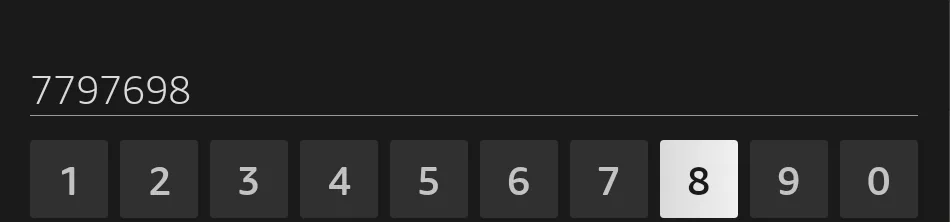
Type 7797698
Type the code 7797698 and choose Go (on some keyboards the button is called Next).
- 6
Wait a few seconds
Downloader takes you to iptvplayerone.com/fire and fetches the app. That takes about ten seconds.

- 7
Choose Install, then Open
You see IPTV Player One with the red icon. Choose Install, and when it is done Open. If Downloader then asks whether it may delete the file, choose Delete: the app stays installed.
- 8
Add your playlist
The app opens with a QR code. Scan it with your phone and enter your M3U link or Xtream Codes details there, so you do not have to type on the TV. You can also enter them on the TV right away. Not sure which one you have? Read M3U vs Xtream Codes.
Good to know on Fire TV
The app speaks 31 languages. Playback covers .mkv and HEVC, and 4K on a Fire TV Stick 4K, 4K Max or Fire TV Cube. You can keep several playlists side by side, each with its own library.
Still stuck? Open a ticket in the supportdesk and you usually get a reply within a day.
Frequently asked questions
Downloader says it is not allowed to install the app.
Do step 3 again: Downloader must be switched on under Install unknown apps. If you do not see Developer Options, do step 2 first.
My Fire TV has no developer options at all.
Then it most likely runs Vega OS, like the Fire TV Stick 4K Select and the Fire TV Stick HD. You cannot install apps from outside the Appstore on those, so IPTV Player One does not run there. The Fire TV page lists the devices that do work.
What does it cost?
The first 14 days are free. After that the app shows a QR code: scan it with your phone and pay on our website, $5.99 for one year. It does not renew automatically and you do not need an Amazon account.
Do I have to do this again for every new version?
No. The app tells you when there is a new version and installs it with one press of a button. The first time, Fire OS asks whether IPTV Player One may install apps: allow that once.
Related pages
IPTV Player for Fire TV Stick: Downloader Code 7797698
IPTV player for Fire TV Stick and Firestick 4K Max: type Downloader code 7797698, add your M3U or Xtream Codes playlist, pay on your phone. 14 days free.
M3U vs Xtream Codes: which should you use?
M3U link or Xtream Codes login? What each gives you in IPTV Player One on Windows, Mac, Apple TV and Android TV, and what to do when get.php is blocked.
FAQ: Trial, Prices, Apple TV, Android TV
IPTV Player One FAQ: 14-day free trial, prices per store, Mac App Store, Apple TV, Android TV, Chromecast casting, M3U and Xtream playlists, refunds.
Try IPTV Player One free for 14 days
No account and no payment details. Install, add your playlist and watch.